When I started writing the simple issue tracker it was with the goal of learning more about Grails and coming away with a generally useful project. I decided to blog it because I was hoping my insights might be useful to the community. The response has been awesome, with lots of encouragement and lots of great ideas.
It strikes me that I can probably learn more from the community than just working away on my own. So if you want to fix something I screwed up or you have ideas for new features or you just want to experiment, drop me a line and I'll add you to the SimpleIssue project out at Google Code. Mike Hugo has already pointed out my embarrassing lack of tests and has offered to lend a hand. This is great news for me because testing has never been my strong suit. It will give me an opportunity to study how it's done.
SimpleIssue is a nights and weekends project for me, so I don't expect any particular level of participation. If you've got ideas and want to contribute, then all the better for us.
Showing posts with label issue tracker. Show all posts
Showing posts with label issue tracker. Show all posts
Monday, May 12, 2008

Sunday, May 11, 2008
Writing a Simple Issue Tracker in Grails, Part 2
This is the long overdue follow up to my Writing a Simple Issue Tracker in Grails post. In this post I'll be detailing how to add security with the JSecurity plugin.
So let's dive right in and work on securing our application. I opted to use the JSecurity plugin for no other reason than I've used the Acegi plugin in the past and wanted to see how JSecurity compares. You could use the Acegi plugin with a similar process and results.
Following the JSecurity Quick Start guide, we'll begin by installing the plugin and running the quick start script:
The quick start script created a few domain classes as well as a controller for logging in and out. Now we need to setup an Administrator user and role to test things with. We'll just cut and paste the Administrator role setup right from the Quick Start guide into our Bootstrap.groovy file:
With the administrator user in place, we can start securing our controllers. JSecurity makes this drop dead simple by letting you specify rules in the conf/SecurityFilters.groovy file.
Before we dive in and start writing our rules, let's think about what we want users to be able to do. I'm going to keep things simple and have two classes of users: anonymous and administrators. However, you could easily create a third class of users, authenticated, that would have more permissions than the anonymous users but less than the administrators.
Administrators should be able to create, edit, and delete Projects, Components, and Issues. Additionally, Administrators should be able to access the admin controller.
Depending on how private you want your issue tracker, anonymous users might be able to list and show the Projects, Components, and Issues or they might not. They may also create new issues or they may not. To handle this, I'm going to create two new configuration parameters that control how secure the application is by adding the following lines to Config.groovy:
These configuration options will let us configure whether anonymous users can create issues (issue.secure.create = true) and whether anonymous users can view issues (issue.secure.view = false). In the above example, creating a new issue is secured (requires the user be logged in) but viewing is not.
Now that we have an idea of our security rules, let's codify them in the conf/SecurityFilters.groovy file:
So with that we should have a secured grails app. Obviously there are plenty of things we can improve. First off, there is no user management code. We'll probably want to generate a controller to allow new users to register as well as to allow Administrators to add new users. The views could be cleaned up quite a bit and we could add a custom logo. Finally there are numerous other options that folks have suggested, including saved searches, internationalization, etc.
I've gone ahead and created a new Google Code project with the code from this article. If you're interested in hacking on this code, let me know. In the next installment, which I promise won't take a month, I'll be adding search/filtering support via the Searchable plugin and creating an API so I can create new issues from external applications.
Cheers,
Josh
So let's dive right in and work on securing our application. I opted to use the JSecurity plugin for no other reason than I've used the Acegi plugin in the past and wanted to see how JSecurity compares. You could use the Acegi plugin with a similar process and results.
Following the JSecurity Quick Start guide, we'll begin by installing the plugin and running the quick start script:
grails install-plugin jsecurity
grails quick-start
The quick start script created a few domain classes as well as a controller for logging in and out. Now we need to setup an Administrator user and role to test things with. We'll just cut and paste the Administrator role setup right from the Quick Start guide into our Bootstrap.groovy file:
import org.jsecurity.crypto.hash.Sha1Hash

class BootStrap {

    def init = {servletContext ->
        // Administrator user and role.
        def adminRole = new JsecRole(name: "Administrator").save()
        def adminUser = new JsecUser(username: "admin", passwordHash: new Sha1Hash("admin").toHex()).save()
        new JsecUserRoleRel(user: adminUser, role: adminRole).save()
    }

    def destroy = {
    }
}
With the administrator user in place, we can start securing our controllers. JSecurity makes this drop dead simple by letting you specify rules in the conf/SecurityFilters.groovy file.
Before we dive in and start writing our rules, let's think about what we want users to be able to do. I'm going to keep things simple and have two classes of users: anonymous and administrators. However, you could easily create a third class of users, authenticated, that would have more permissions than the anonymous users but less than the administrators.
Administrators should be able to create, edit, and delete Projects, Components, and Issues. Additionally, Administrators should be able to access the admin controller.
Depending on how private you want your issue tracker, anonymous users might be able to list and show the Projects, Components, and Issues or they might not. They may also create new issues or they may not. To handle this, I'm going to create two new configuration parameters that control how secure the application is by adding the following lines to Config.groovy:
issue.secure.create = true
issue.secure.view = false
These configuration options will let us configure whether anonymous users can create issues (issue.secure.create = true) and whether anonymous users can view issues (issue.secure.view = false). In the above example, creating a new issue is secured (requires the user be logged in) but viewing is not.
Now that we have an idea of our security rules, let's codify them in the conf/SecurityFilters.groovy file:
import org.codehaus.groovy.grails.commons.ApplicationHolder

class SecurityFilters {
    def filters = {

        // secure the project controller
        projectCreationAndEditing(controller: "project", action: "(create|edit|save|update|delete)") {
            before = {
                accessControl {
                    role("Administrator")
                }
            }
        }

        // secure the component controller
        componentCreationAndEditing(controller: "component", action: "(create|edit|save|update|delete)") {
            before = {
                accessControl {
                    role("Administrator")
                }
            }
        }

        // secure issue editing
        issueEditing(controller: "issue", action: "(edit|update|delete)") {
            before = {
                accessControl {
                    role("Administrator")
                }
            }
        }

        // secure admin controller
        admin(controller: "admin", action: "*") {
            before = {
                accessControl {
                    role("Administrator")
                }
            }
        }

        // secure creating issues if Config#issue.secure.create = true
        if (ApplicationHolder.application.config?.issue?.secure?.create) {
            issueCreation(controller: "issue", action: "(create|save)") {
                before = {
                    accessControl {
                        role("Administrator")
                    }
                }
            }
        }

        // secure viewing issues if Config#issue.secure.view = true
        if (ApplicationHolder.application.config?.issue?.secure?.view) {
            issueBrowsing(controller: "issue", action: "(show|list)") {
                before = {
                    accessControl {
                        role("Administrator")
                    }
                }
            }

            componentBrowsing(controller: "component", action: "(show|list)") {
                before = {
                    accessControl {
                        role("Administrator")
                    }
                }
            }

            projectBrowsing(controller: "project", action: "(show|list)") {
                before = {
                    accessControl {
                        role("Administrator")
                    }
                }
            }
        }
    }
}
So with that we should have a secured grails app. Obviously there are plenty of things we can improve. First off, there is no user management code. We'll probably want to generate a controller to allow new users to register as well as to allow Administrators to add new users. The views could be cleaned up quite a bit and we could add a custom logo. Finally there are numerous other options that folks have suggested, including saved searches, internationalization, etc.
I've gone ahead and created a new Google Code project with the code from this article. If you're interested in hacking on this code, let me know. In the next installment, which I promise won't take a month, I'll be adding search/filtering support via the Searchable plugin and creating an API so I can create new issues from external applications.
Cheers,
Josh
Sunday, April 13, 2008
Writing a Simple Issue Tracker in Grails, Part 1
My project for the weekend was to write a simple issue tracking webapp in Grails. I could have used something like Trac but that's overkill for my needs. I just wanted something simple where my users could report issues and request new features. I also wanted to add a few personal touches, which I'll show you along the way.
I'm going to assuming that you're not absolutely new to Grails and you've already got it installed and played around with it. If that's not the case, I suggest checking out Scott Davis's Mastering Grails series of articles. He's goes into far more detail than I do, so check them out.
Let's start by creating our project:
First up is to define our domain models. We're going to keep it simple with just three models:
So let's lay down the code:
Project.groovy
Component.groovy
Issue.groovy
Most of the code is a pretty straightforward translation of our written description of the domain. You may, however, notice a few peculiar constraints. I've used a fair number of 'empty' constraints such as:
By default, Grails treats all fields in the domain class as required. I didn't want to change that, but I wanted to affect the order that the fields show up in a particular order in the web forms. By specifying the constraint, even if it is empty, it'll show up in that order in our forms. Of course, we could have customized the field order by hand directly in the view GSP code.
I also make use of the
Finally, we specify our issue description as being
With our domain classes in place, we can create our controllers and views to test things out:
Fire up your browser and test things out by visiting http://localhost:8080/simpleissue:
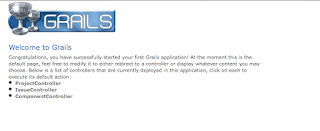 and our issue creation form:
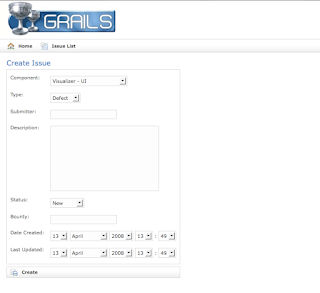
Looks pretty decent for 5 minutes of work. Poke around and test creating a project, component, and a few issues.
Customizing the Look
Now let's clean things up a bit and add some polish. The first thing I want to do is have the index page show the list of issues. We could copy and paste the code from the Issue List view or we can simply add a redirect to the top of our
The next thing I want to do is clean up the issue creation form. A few of the values, such as
You may have noticed an odd field in the
As a final customization, I want to convert the number of beers into little beer mug icons to make it easy to see the important issues to fix. We'll do this by first copying the
This will create a
And we'll call it in our
Here's a look at the final output:
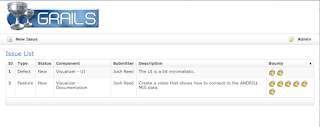 In part 2, we're going to add in some security to prevent arbitrary user's from editing and deleting issues. We'll also add in searching/filtering support with the Searchable plugin.
Cheers.
I'm going to assuming that you're not absolutely new to Grails and you've already got it installed and played around with it. If that's not the case, I suggest checking out Scott Davis's Mastering Grails series of articles. He's goes into far more detail than I do, so check them out.
Let's start by creating our project:
grails create-app simpleissueFirst up is to define our domain models. We're going to keep it simple with just three models:
Project, Component, and Issue. A Project has one or more Components, such as ui, documentation, etc. A Component is associated with a single Project and has zero or more Issues associated with it. The Issue object is associated with a Component and captures a bunch of information.So let's lay down the code:
Project.groovy
class Project {
    // relationships
    static hasMany = [components: Component]

    // fields
    String name

    String toString() {
        return name
    }

    // constraints
    static constraints = {
        name()
        components()
    }
}
Component.groovy
class Component {
    // relationships
    static belongsTo = Project
    static hasMany = [issues: Issue]

    // fields
    Project project
    String name

    // override for nice display
    String toString() {
        return "${project} - ${name}"
    }

    // constraints
    static def constraints = {
        name()
        project()
        issues()
    }
}
Issue.groovy
class Issue {
    // relationships
    static belongsTo = Component

    // fields
    Component component
    String type
    String submitter
    String description
    String status = "New"
    Integer bounty
    Date dateCreated
    Date lastUpdated

    // constraints
    static constraints = {
        component()
        type(inList: ["Defect", "Feature"])
        submitter()
        description(size: 0..5000)
        status(inList: ["New", "Accepted", "Closed", "Won't Fix"])
        bounty(range:0..12)
    }
}
Most of the code is a pretty straightforward translation of our written description of the domain. You may, however, notice a few peculiar constraints. I've used a fair number of 'empty' constraints such as:
static def constraints = {
   name()
   project()
   issues()
}
By default, Grails treats all fields in the domain class as required. I didn't want to change that, but I wanted to affect the order that the fields show up in a particular order in the web forms. By specifying the constraint, even if it is empty, it'll show up in that order in our forms. Of course, we could have customized the field order by hand directly in the view GSP code.
I also make use of the
inList constraint to limit the fields to a specific set of values. Our views will be generated with an HTML select drop down containing the list of values we've specified.Finally, we specify our issue description as being
size:0..5000. This will ensure that there is plenty of space in the database for the description text. If we hadn't specified this, the description would have been generated as a varchar(255).With our domain classes in place, we can create our controllers and views to test things out:
grails generate-all Project
grails generate-all Component
grails generate-all Issue
grails run-app
Fire up your browser and test things out by visiting http://localhost:8080/simpleissue:
 and our issue creation form:
Looks pretty decent for 5 minutes of work. Poke around and test creating a project, component, and a few issues.
Customizing the Look
Now let's clean things up a bit and add some polish. The first thing I want to do is have the index page show the list of issues. We could copy and paste the code from the Issue List view or we can simply add a redirect to the top of our
web-app/index.gsp file:
<% response.sendRedirect('issue/list') %>
The next thing I want to do is clean up the issue creation form. A few of the values, such as
status, dateCreated, lastUpdated don't need to be specified in the form. We can go into grails-app/views/issue/create.gsp and remove those fields.You may have noticed an odd field in the
Issue domain class: bounty. You might have expected to see a field for priority on the issue. Instead, I chose to add a "beer bounty" field where the issue submitter could pledge a certain number of beers that I could redeem upon completion of the issue. This is, in my opinion, far superior to simply assigning low, medium, high priorities to issues.As a final customization, I want to convert the number of beers into little beer mug icons to make it easy to see the important issues to fix. We'll do this by first copying the
repeat example tag from the Dynamic Tag Libraries page of the documentation:grails create-tag-lib MiscThis will create a
grails-app/taglib/MiscTagLib.groovy file which we can add:
class MiscTagLib {
    def repeat = {attrs, body ->
        def i = Integer.valueOf(attrs["times"])
        def current = 0
        i.times {
            out << body(++current)
        }
    }
}
And we'll call it in our
grails-app/views/issue/list.gsp:
<g:repeat times="${issue.bounty}">
    <img src="${createLinkTo(dir:'images', file:'beer.gif')}" alt="${issue.bounty} beers"/>
</g:repeat>
Here's a look at the final output:
 In part 2, we're going to add in some security to prevent arbitrary user's from editing and deleting issues. We'll also add in searching/filtering support with the Searchable plugin.
Cheers.
Subscribe to:
Posts (Atom)
