When I started writing the simple issue tracker it was with the goal of learning more about Grails and coming away with a generally useful project. I decided to blog it because I was hoping my insights might be useful to the community. The response has been awesome, with lots of encouragement and lots of great ideas.
It strikes me that I can probably learn more from the community than just working away on my own. So if you want to fix something I screwed up or you have ideas for new features or you just want to experiment, drop me a line and I'll add you to the SimpleIssue project out at Google Code. Mike Hugo has already pointed out my embarrassing lack of tests and has offered to lend a hand. This is great news for me because testing has never been my strong suit. It will give me an opportunity to study how it's done.
SimpleIssue is a nights and weekends project for me, so I don't expect any particular level of participation. If you've got ideas and want to contribute, then all the better for us.
Showing posts with label grails. Show all posts
Showing posts with label grails. Show all posts
Monday, May 12, 2008

Sunday, May 11, 2008
Writing a Simple Issue Tracker in Grails, Part 2
This is the long overdue follow up to my Writing a Simple Issue Tracker in Grails post. In this post I'll be detailing how to add security with the JSecurity plugin.
So let's dive right in and work on securing our application. I opted to use the JSecurity plugin for no other reason than I've used the Acegi plugin in the past and wanted to see how JSecurity compares. You could use the Acegi plugin with a similar process and results.
Following the JSecurity Quick Start guide, we'll begin by installing the plugin and running the quick start script:
The quick start script created a few domain classes as well as a controller for logging in and out. Now we need to setup an Administrator user and role to test things with. We'll just cut and paste the Administrator role setup right from the Quick Start guide into our Bootstrap.groovy file:
With the administrator user in place, we can start securing our controllers. JSecurity makes this drop dead simple by letting you specify rules in the conf/SecurityFilters.groovy file.
Before we dive in and start writing our rules, let's think about what we want users to be able to do. I'm going to keep things simple and have two classes of users: anonymous and administrators. However, you could easily create a third class of users, authenticated, that would have more permissions than the anonymous users but less than the administrators.
Administrators should be able to create, edit, and delete Projects, Components, and Issues. Additionally, Administrators should be able to access the admin controller.
Depending on how private you want your issue tracker, anonymous users might be able to list and show the Projects, Components, and Issues or they might not. They may also create new issues or they may not. To handle this, I'm going to create two new configuration parameters that control how secure the application is by adding the following lines to Config.groovy:
These configuration options will let us configure whether anonymous users can create issues (issue.secure.create = true) and whether anonymous users can view issues (issue.secure.view = false). In the above example, creating a new issue is secured (requires the user be logged in) but viewing is not.
Now that we have an idea of our security rules, let's codify them in the conf/SecurityFilters.groovy file:
So with that we should have a secured grails app. Obviously there are plenty of things we can improve. First off, there is no user management code. We'll probably want to generate a controller to allow new users to register as well as to allow Administrators to add new users. The views could be cleaned up quite a bit and we could add a custom logo. Finally there are numerous other options that folks have suggested, including saved searches, internationalization, etc.
I've gone ahead and created a new Google Code project with the code from this article. If you're interested in hacking on this code, let me know. In the next installment, which I promise won't take a month, I'll be adding search/filtering support via the Searchable plugin and creating an API so I can create new issues from external applications.
Cheers,
Josh
So let's dive right in and work on securing our application. I opted to use the JSecurity plugin for no other reason than I've used the Acegi plugin in the past and wanted to see how JSecurity compares. You could use the Acegi plugin with a similar process and results.
Following the JSecurity Quick Start guide, we'll begin by installing the plugin and running the quick start script:
grails install-plugin jsecurity
grails quick-start
The quick start script created a few domain classes as well as a controller for logging in and out. Now we need to setup an Administrator user and role to test things with. We'll just cut and paste the Administrator role setup right from the Quick Start guide into our Bootstrap.groovy file:
import org.jsecurity.crypto.hash.Sha1Hash

class BootStrap {

    def init = {servletContext ->
        // Administrator user and role.
        def adminRole = new JsecRole(name: "Administrator").save()
        def adminUser = new JsecUser(username: "admin", passwordHash: new Sha1Hash("admin").toHex()).save()
        new JsecUserRoleRel(user: adminUser, role: adminRole).save()
    }

    def destroy = {
    }
}
With the administrator user in place, we can start securing our controllers. JSecurity makes this drop dead simple by letting you specify rules in the conf/SecurityFilters.groovy file.
Before we dive in and start writing our rules, let's think about what we want users to be able to do. I'm going to keep things simple and have two classes of users: anonymous and administrators. However, you could easily create a third class of users, authenticated, that would have more permissions than the anonymous users but less than the administrators.
Administrators should be able to create, edit, and delete Projects, Components, and Issues. Additionally, Administrators should be able to access the admin controller.
Depending on how private you want your issue tracker, anonymous users might be able to list and show the Projects, Components, and Issues or they might not. They may also create new issues or they may not. To handle this, I'm going to create two new configuration parameters that control how secure the application is by adding the following lines to Config.groovy:
issue.secure.create = true
issue.secure.view = false
These configuration options will let us configure whether anonymous users can create issues (issue.secure.create = true) and whether anonymous users can view issues (issue.secure.view = false). In the above example, creating a new issue is secured (requires the user be logged in) but viewing is not.
Now that we have an idea of our security rules, let's codify them in the conf/SecurityFilters.groovy file:
import org.codehaus.groovy.grails.commons.ApplicationHolder

class SecurityFilters {
    def filters = {

        // secure the project controller
        projectCreationAndEditing(controller: "project", action: "(create|edit|save|update|delete)") {
            before = {
                accessControl {
                    role("Administrator")
                }
            }
        }

        // secure the component controller
        componentCreationAndEditing(controller: "component", action: "(create|edit|save|update|delete)") {
            before = {
                accessControl {
                    role("Administrator")
                }
            }
        }

        // secure issue editing
        issueEditing(controller: "issue", action: "(edit|update|delete)") {
            before = {
                accessControl {
                    role("Administrator")
                }
            }
        }

        // secure admin controller
        admin(controller: "admin", action: "*") {
            before = {
                accessControl {
                    role("Administrator")
                }
            }
        }

        // secure creating issues if Config#issue.secure.create = true
        if (ApplicationHolder.application.config?.issue?.secure?.create) {
            issueCreation(controller: "issue", action: "(create|save)") {
                before = {
                    accessControl {
                        role("Administrator")
                    }
                }
            }
        }

        // secure viewing issues if Config#issue.secure.view = true
        if (ApplicationHolder.application.config?.issue?.secure?.view) {
            issueBrowsing(controller: "issue", action: "(show|list)") {
                before = {
                    accessControl {
                        role("Administrator")
                    }
                }
            }

            componentBrowsing(controller: "component", action: "(show|list)") {
                before = {
                    accessControl {
                        role("Administrator")
                    }
                }
            }

            projectBrowsing(controller: "project", action: "(show|list)") {
                before = {
                    accessControl {
                        role("Administrator")
                    }
                }
            }
        }
    }
}
So with that we should have a secured grails app. Obviously there are plenty of things we can improve. First off, there is no user management code. We'll probably want to generate a controller to allow new users to register as well as to allow Administrators to add new users. The views could be cleaned up quite a bit and we could add a custom logo. Finally there are numerous other options that folks have suggested, including saved searches, internationalization, etc.
I've gone ahead and created a new Google Code project with the code from this article. If you're interested in hacking on this code, let me know. In the next installment, which I promise won't take a month, I'll be adding search/filtering support via the Searchable plugin and creating an API so I can create new issues from external applications.
Cheers,
Josh
Sunday, April 13, 2008
Writing a Simple Issue Tracker in Grails, Part 1
My project for the weekend was to write a simple issue tracking webapp in Grails. I could have used something like Trac but that's overkill for my needs. I just wanted something simple where my users could report issues and request new features. I also wanted to add a few personal touches, which I'll show you along the way.
I'm going to assuming that you're not absolutely new to Grails and you've already got it installed and played around with it. If that's not the case, I suggest checking out Scott Davis's Mastering Grails series of articles. He's goes into far more detail than I do, so check them out.
Let's start by creating our project:
First up is to define our domain models. We're going to keep it simple with just three models:
So let's lay down the code:
Project.groovy
Component.groovy
Issue.groovy
Most of the code is a pretty straightforward translation of our written description of the domain. You may, however, notice a few peculiar constraints. I've used a fair number of 'empty' constraints such as:
By default, Grails treats all fields in the domain class as required. I didn't want to change that, but I wanted to affect the order that the fields show up in a particular order in the web forms. By specifying the constraint, even if it is empty, it'll show up in that order in our forms. Of course, we could have customized the field order by hand directly in the view GSP code.
I also make use of the
Finally, we specify our issue description as being
With our domain classes in place, we can create our controllers and views to test things out:
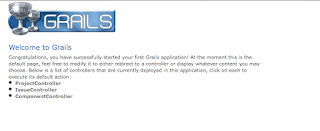
Fire up your browser and test things out by visiting http://localhost:8080/simpleissue:
 and our issue creation form:
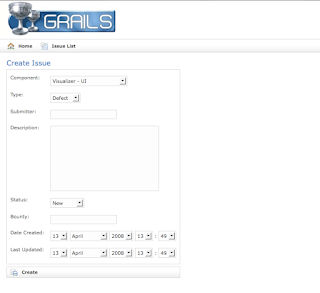
Looks pretty decent for 5 minutes of work. Poke around and test creating a project, component, and a few issues.
Customizing the Look
Now let's clean things up a bit and add some polish. The first thing I want to do is have the index page show the list of issues. We could copy and paste the code from the Issue List view or we can simply add a redirect to the top of our
The next thing I want to do is clean up the issue creation form. A few of the values, such as
You may have noticed an odd field in the
As a final customization, I want to convert the number of beers into little beer mug icons to make it easy to see the important issues to fix. We'll do this by first copying the
This will create a
And we'll call it in our
Here's a look at the final output:
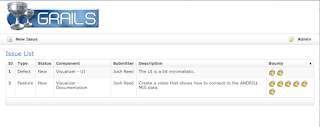 In part 2, we're going to add in some security to prevent arbitrary user's from editing and deleting issues. We'll also add in searching/filtering support with the Searchable plugin.
Cheers.
I'm going to assuming that you're not absolutely new to Grails and you've already got it installed and played around with it. If that's not the case, I suggest checking out Scott Davis's Mastering Grails series of articles. He's goes into far more detail than I do, so check them out.
Let's start by creating our project:
grails create-app simpleissueFirst up is to define our domain models. We're going to keep it simple with just three models:
Project, Component, and Issue. A Project has one or more Components, such as ui, documentation, etc. A Component is associated with a single Project and has zero or more Issues associated with it. The Issue object is associated with a Component and captures a bunch of information.So let's lay down the code:
Project.groovy
class Project {
    // relationships
    static hasMany = [components: Component]

    // fields
    String name

    String toString() {
        return name
    }

    // constraints
    static constraints = {
        name()
        components()
    }
}
Component.groovy
class Component {
    // relationships
    static belongsTo = Project
    static hasMany = [issues: Issue]

    // fields
    Project project
    String name

    // override for nice display
    String toString() {
        return "${project} - ${name}"
    }

    // constraints
    static def constraints = {
        name()
        project()
        issues()
    }
}
Issue.groovy
class Issue {
    // relationships
    static belongsTo = Component

    // fields
    Component component
    String type
    String submitter
    String description
    String status = "New"
    Integer bounty
    Date dateCreated
    Date lastUpdated

    // constraints
    static constraints = {
        component()
        type(inList: ["Defect", "Feature"])
        submitter()
        description(size: 0..5000)
        status(inList: ["New", "Accepted", "Closed", "Won't Fix"])
        bounty(range:0..12)
    }
}
Most of the code is a pretty straightforward translation of our written description of the domain. You may, however, notice a few peculiar constraints. I've used a fair number of 'empty' constraints such as:
static def constraints = {
   name()
   project()
   issues()
}
By default, Grails treats all fields in the domain class as required. I didn't want to change that, but I wanted to affect the order that the fields show up in a particular order in the web forms. By specifying the constraint, even if it is empty, it'll show up in that order in our forms. Of course, we could have customized the field order by hand directly in the view GSP code.
I also make use of the
inList constraint to limit the fields to a specific set of values. Our views will be generated with an HTML select drop down containing the list of values we've specified.Finally, we specify our issue description as being
size:0..5000. This will ensure that there is plenty of space in the database for the description text. If we hadn't specified this, the description would have been generated as a varchar(255).With our domain classes in place, we can create our controllers and views to test things out:
grails generate-all Project
grails generate-all Component
grails generate-all Issue
grails run-app
Fire up your browser and test things out by visiting http://localhost:8080/simpleissue:
 and our issue creation form:
Looks pretty decent for 5 minutes of work. Poke around and test creating a project, component, and a few issues.
Customizing the Look
Now let's clean things up a bit and add some polish. The first thing I want to do is have the index page show the list of issues. We could copy and paste the code from the Issue List view or we can simply add a redirect to the top of our
web-app/index.gsp file:
<% response.sendRedirect('issue/list') %>
The next thing I want to do is clean up the issue creation form. A few of the values, such as
status, dateCreated, lastUpdated don't need to be specified in the form. We can go into grails-app/views/issue/create.gsp and remove those fields.You may have noticed an odd field in the
Issue domain class: bounty. You might have expected to see a field for priority on the issue. Instead, I chose to add a "beer bounty" field where the issue submitter could pledge a certain number of beers that I could redeem upon completion of the issue. This is, in my opinion, far superior to simply assigning low, medium, high priorities to issues.As a final customization, I want to convert the number of beers into little beer mug icons to make it easy to see the important issues to fix. We'll do this by first copying the
repeat example tag from the Dynamic Tag Libraries page of the documentation:grails create-tag-lib MiscThis will create a
grails-app/taglib/MiscTagLib.groovy file which we can add:
class MiscTagLib {
    def repeat = {attrs, body ->
        def i = Integer.valueOf(attrs["times"])
        def current = 0
        i.times {
            out << body(++current)
        }
    }
}
And we'll call it in our
grails-app/views/issue/list.gsp:
<g:repeat times="${issue.bounty}">
    <img src="${createLinkTo(dir:'images', file:'beer.gif')}" alt="${issue.bounty} beers"/>
</g:repeat>
Here's a look at the final output:
 In part 2, we're going to add in some security to prevent arbitrary user's from editing and deleting issues. We'll also add in searching/filtering support with the Searchable plugin.
Cheers.
Saturday, April 12, 2008
Searchable: Me Too!
I've got to echo what seems to be the community consensus: use the Searchable plugin for Grails if you need to do any sort of searching or filtering. It just works and it works damn well. I'm using it to search/filter some lists of domain objects in my app with nice paging support. I added the plugin to an existing, deployed application in less than an hour this afternoon. The documentation was straightforward and easy to understand.
The only real trick I did was using the 'component' option for searching related domain classes. Take my domain class below:
By default, related domain classes such as User, Hole, and SampleGroup above are treated as references. When I was searching for something like "micropaleo" which happens to be the name of a
and added
The best part is, my user's think I'm some sort of programming deity because they asked for search and I added it that same day. Hopefully none of them read this blog and see how little work it was for me.
Cheers.
The only real trick I did was using the 'component' option for searching related domain classes. Take my domain class below:
class SampleRequest {
    static searchable = true
    static hasMany = [samples: Sample]
    static mappedBy = [samples: "request"]
    static belongsTo = User

    // fields
    User investigator
    Hole hole
    Double top
    Double bottom
    String sampleType
    Integer samplesRequested = 1
    Double sampleSpacing = 0.0
    SampleGroup sampleGroup
    String notes = ""
    Date created = new Date()
    String status = STATE_NEW
    Integer priority = 1
}
By default, related domain classes such as User, Hole, and SampleGroup above are treated as references. When I was searching for something like "micropaleo" which happens to be the name of a
SampleGroup object, Searchable would return the actual SampleGroup but not all of the SampleRequest objects in that group. Since I was mainly interested in the sample requests in that group, I simply changed my searchable definition to:
static searchable = {
    hole component:true
    investigator component:true
    sampleGroup component:true
}
and added
static def searchable = true to my User, Hole, and SampleGroup domain classes. So now when I search for something like "micropaleo" or "olney" the sample requests in that group or by that user are returned.The best part is, my user's think I'm some sort of programming deity because they asked for search and I added it that same day. Hopefully none of them read this blog and see how little work it was for me.
Cheers.
Tuesday, April 08, 2008
Antarctica Service Medal
Not too much technical content tonight. I spent most of the afternoon trying to get OSGi working from a Java Webstart application without much luck. It may be something that I revisit down the road, but for the time being distributing a zip with a set of shell scripts should work. As part of the process, I also learned how to sign a Jar file, which will be useful in an upcoming project.
This morning I pushed out the first update to the Grails app I have in production. Just before performing the actual update, I remembered to double check that my production DataSource was set to 'update' instead of 'create' or 'create-drop' the database. It was lucky I checked because it was set to 'create' from when I was wrangling with MySQL. I had already made a dump of the database, so I wouldn't have lost any data, but I was glad that I checked.
On the non-technical front, I received an Antarctica Service Medal in the mail for the time I spent in Antarctica:

I probably won't have too many occasions to actually wear it, but the medal is a nice memento of my time down there.
And the countdown has begun: 9 days until I'm in the Bahamas for my wedding and honeymoon. Pretty crazy!
This morning I pushed out the first update to the Grails app I have in production. Just before performing the actual update, I remembered to double check that my production DataSource was set to 'update' instead of 'create' or 'create-drop' the database. It was lucky I checked because it was set to 'create' from when I was wrangling with MySQL. I had already made a dump of the database, so I wouldn't have lost any data, but I was glad that I checked.
On the non-technical front, I received an Antarctica Service Medal in the mail for the time I spent in Antarctica:

I probably won't have too many occasions to actually wear it, but the medal is a nice memento of my time down there.
And the countdown has begun: 9 days until I'm in the Bahamas for my wedding and honeymoon. Pretty crazy!
Sunday, April 06, 2008
Pluggable Service Implementations in Grails
This weekend I was working on a
I wanted to be able to easily specify which implementation to use without having to refactor my code and I wanted to be able to configure the implementation based upon the environment. For development and integration testing, it would be easiest to test with a simple File-based service. When I actually rolled it out to production, I would likely want to use something more scalable like Amazon's S3.
I didn't know how (if?) Grails handled this situation, so I decided to write my own. I drew inspiration from Shawn Harstock's post about Fun with Grails Configuration Files for managing service configuration in the various environments.
The first thing I did was create a stub service,
The service looks up and loads the storage provider class based on a configuration parameter. For example, my
In development, the
My controllers don't need to know which provider implementation, they just declare a
So my only question is, did I just re-invent the wheel? Does Grails already have a mechanism for handling this? If not, how would you accomplish the task?
Update: Check out David Hernández's explanation of how to do this with Spring. No icky, ClassForName needed. Nice work, David!
Cheers.
StorageService service in Grails. The service takes a file, stores it somewhere, and then returns the URL where the file can be retrieved from. I can envision having multiple implementations of this service: one that simply puts the file in a directory for something like Tomcat/Apache/Nginx to serve up, one that puts the contents of the file into a database blob and has a controller that retrieves it from the database and serves it up, and one that stores the file on Amazon S3.I wanted to be able to easily specify which implementation to use without having to refactor my code and I wanted to be able to configure the implementation based upon the environment. For development and integration testing, it would be easiest to test with a simple File-based service. When I actually rolled it out to production, I would likely want to use something more scalable like Amazon's S3.
I didn't know how (if?) Grails handled this situation, so I decided to write my own. I drew inspiration from Shawn Harstock's post about Fun with Grails Configuration Files for managing service configuration in the various environments.
The first thing I did was create a stub service,
StorageService:
import org.codehaus.groovy.grails.commons.ApplicationHolder

class StorageService {
   boolean transactional = true
   boolean initialized = false
   def provider = null

   String store(File file) {
       // initialize our provider
       if (!initialized) {
           initializeProvider()
       }

       // use our provider or log the error
       if (provider == null) {
           // log the error
           return null
       } else {
           return provider.store(file)
       }
   }

   def initializeProvider() {
       initialized = true;

       // get our provider name
       def prefix = ApplicationHolder.application.config?.storage?.provider
       if (prefix == null) {
           prefix = "Default"
       } else {
           def index = prefix.lastIndexOf('.')
           if (index == -1) {
               prefix = prefix[0].toUpperCase() + prefix[1..-1]
           } else {
               prefix = prefix[0..index] + prefix[index+1].toUpperCase() + prefix[(index+2)..-1]
           }
       }

       // try creating the provider
       provider = Class.forName("${prefix}StorageProvider")?.newInstance()
   }
}
The service looks up and loads the storage provider class based on a configuration parameter. For example, my
Config.groovy file might look like this:
...
environments {
   development {
       storage {
           provider="file"
       }
   }
   test {
       storage {
           provider="org.andrill.mock"
       }
   }
   production {
       storage {
           provider="s3"
       }
   }

}
...
In development, the
StorageService would try to load the class FileStorageProvider and delegate calls to it. In testing, it would try to load the class org.andrill.MockStorageProvider and delegate calls to it. And finally, in production it would try to use the S3StorageProvider.My controllers don't need to know which provider implementation, they just declare a
StorageService storageService field, which Spring auto-wires for them, and go. It works like a charm.So my only question is, did I just re-invent the wheel? Does Grails already have a mechanism for handling this? If not, how would you accomplish the task?
Update: Check out David Hernández's explanation of how to do this with Spring. No icky, ClassForName needed. Nice work, David!
Cheers.
Tuesday, April 01, 2008
Grails and MySQL Connection Errors
I ran into a few configuration problems when I tried to push a Grails webapp into production and make it talk to a MySQL database instead of the standard HSQL database. These notes might be useful to someone who is pulling their hair out trying to get Grails talking to MySQL database.
My production machine is a CentOS 5 box running MySQL 5, Sun JDK 5, and Tomcat 5.5 (incidentally, my webapp's version happened to be 0.5 which rounds out the '5' theme nicely).
I started by pulling down the MySQL JDBC driver and dropping it into my
I then
Over on the production server, I connected to MySQL with the
I verified things worked by connecting to the new database as the newly created user and creating a table.
I dropped the war into my
After double checking my
Google revealed that one common problem is to forget to enable networking in MySQL. I double checked my
Normally you would expect MySQL to only need to listen locally. In my case, however, the production MySQL server replicates to a slave server for backup, so it needs to listen on the external interface. The firewall locked down to prevent all connections to the MySQL port except from the slave server.
On a hunch, I went back and changed my database URL to
The final piece of the puzzle was to go and grant my grailsuser access on all addresses instead of just localhost:
Once this was done, I re-deployed again and was greeted with an error free log. Huzzah!
My production machine is a CentOS 5 box running MySQL 5, Sun JDK 5, and Tomcat 5.5 (incidentally, my webapp's version happened to be 0.5 which rounds out the '5' theme nicely).
I started by pulling down the MySQL JDBC driver and dropping it into my
lib directory. I then updated the production section in my DataSource.groovy file:
...
 production {
       dataSource {
           pooling = true
           driverClassName = "com.mysql.jdbc.Driver"
           dbCreate = "create"
           url = "jdbc:mysql://localhost:3306/grails_webapp"
           username = "grailsuser"
           password = "XXXX"
       }
   }
...
I then
grails wared things up on my local machine and copied it over to the production server.Over on the production server, I connected to MySQL with the
mysql command line utility to create my database and user:
create database grails_webapp;
grant all privileges on grails_webapp.* to 'grailsuser'@'localhost' identified by 'XXXX';
flush privileges;
I verified things worked by connecting to the new database as the newly created user and creating a table.
I dropped the war into my
tomcat/webapps directory and watched the logs. The webapp tries to start but quickly dies, leaving behind a log full of Communications link failure and Connection refused messages. I could see that the MySQL JDBC driver was found, but for whatever reason it couldn't connect to the database server.After double checking my
DataSource.groovy file to make sure my URL, username, and password were all spelled correctly and connecting again locally from the command line to ensure that the database is indeed running, I started Googling.Google revealed that one common problem is to forget to enable networking in MySQL. I double checked my
my.cnf and confirmed that I had enabled networking by specifying a port and an address to bind to. This is where I noticed that the bound address wasn't localhost or 127.0.0.1, but the actual IP address of the machine.Normally you would expect MySQL to only need to listen locally. In my case, however, the production MySQL server replicates to a slave server for backup, so it needs to listen on the external interface. The firewall locked down to prevent all connections to the MySQL port except from the slave server.
On a hunch, I went back and changed my database URL to
jdbc:mysql://the.ip.addr.ess:3306/grails_webapp and tried re-deploying. Things still failed, but with access denied errors instead of connection refused errors. Progress.The final piece of the puzzle was to go and grant my grailsuser access on all addresses instead of just localhost:
grant all privileges on grails_webapp.* to 'grailsuser'@'%' identified by 'XXXX';
flush privileges;
Once this was done, I re-deployed again and was greeted with an error free log. Huzzah!
Monday, March 31, 2008
Back from Boston
I made it back from Boston. The trip was fun but I did not get as much done as I would have at home. Things are looking to be pretty busy this week as I scramble to get caught up. The wedding is in a few weeks. 10 days on the beach in the Bahamas. That thought is what's getting me through the work and stress.
In other news, I'm starting a new project in my spare time. I'm going to keep things under wraps for a bit as I don't have a solid time frame. However, one thing I will mention is that it's going to be a webapp and it's going to contain a social component. I'm hoping the development will yield a series of useful Groovy/Grails blog posts.
I'd also really like to pull together a generic "web 2.0 template" project in Grails. Something that would pull together plugins for security and contain User, Profile, Role-type domain classes, controllers, and views. Ideally you should be able to use it to bootstrap a generic Web 2.0 site with all of the user registration and profile management taken care of. Then you can start adding your specific domain classes to make the site useful.
In other news, I'm starting a new project in my spare time. I'm going to keep things under wraps for a bit as I don't have a solid time frame. However, one thing I will mention is that it's going to be a webapp and it's going to contain a social component. I'm hoping the development will yield a series of useful Groovy/Grails blog posts.
I'd also really like to pull together a generic "web 2.0 template" project in Grails. Something that would pull together plugins for security and contain User, Profile, Role-type domain classes, controllers, and views. Ideally you should be able to use it to bootstrap a generic Web 2.0 site with all of the user registration and profile management taken care of. Then you can start adding your specific domain classes to make the site useful.
Monday, March 24, 2008
Grails Query By Example Gotcha
This is not actually a gotcha in Grails but more a gotcha in my domain class. However, it seems like it might be a common enough scenario to trip up someone else.
I have a domain class which I am populating from an uploaded Excel spreadsheet. Each row in the spreadsheet corresponds to a new instance of the domain class. Since I anticipate that my users will try to upload spreadsheets with errors in some of the rows (not pessimistic, just realistic), I want my app to accept all rows that are properly formatted and provide useful error messages for the rows that are not. I created a spreadsheet that exercised all of my error cases and ran into an unexpected outcome: every time I uploaded the spreadsheet I got duplicates of all of the valid rows in the spreadsheet.
This was surprising because I was using the query by example facilities to check and see if the row was a duplicate. Despite not changing the spreadsheet between uploads, I was still getting duplicates. Then it dawned on me--I had a Date created = new Date() field in my domain class to keep track of when the domain class was created. Simply adding an example.created = null to my query example solved the problem.
Like I said in the opening paragraph, not a gotcha in Grails. The query by example stuff works exactly how I expect it to, you just have to watch out about initialized fields.
I have a domain class which I am populating from an uploaded Excel spreadsheet. Each row in the spreadsheet corresponds to a new instance of the domain class. Since I anticipate that my users will try to upload spreadsheets with errors in some of the rows (not pessimistic, just realistic), I want my app to accept all rows that are properly formatted and provide useful error messages for the rows that are not. I created a spreadsheet that exercised all of my error cases and ran into an unexpected outcome: every time I uploaded the spreadsheet I got duplicates of all of the valid rows in the spreadsheet.
This was surprising because I was using the query by example facilities to check and see if the row was a duplicate. Despite not changing the spreadsheet between uploads, I was still getting duplicates. Then it dawned on me--I had a Date created = new Date() field in my domain class to keep track of when the domain class was created. Simply adding an example.created = null to my query example solved the problem.
Like I said in the opening paragraph, not a gotcha in Grails. The query by example stuff works exactly how I expect it to, you just have to watch out about initialized fields.
Friday, March 21, 2008
Grails Excel File Download
This is the companion to my previous "Grails Excel File Upload" post. In this post, I'll show how to create and send an Excel spreadsheet from your Grails webapp.
The first thing you'll need to do is go out and grab JExcelAPI if haven't already. JExcelAPI will let you read and write Excel spreadsheets from Java. Drop the jxl.jar in your webapp's lib directory.
In my app, I'm providing Excel download functionality from a couple different controllers, each with a different list of domain objects. To enable the highest degree of re-use, I wrote a generic utility method for serializing an object to a row in an Excel spreadsheet:
Edit: See Ted's comment on this post about using eachWithIndex() instead of keeping track of the r and c vars yourself.
This method takes an OutputStream, like the ServletOutputStream you can get from response.outputStream; a map of property names and "nice" header titles; and a list of objects to write to the spreadsheet.
Then I call it from my controller with appropriate values:
The final piece of the puzzle is to make sure you set your content type and content disposition headers before you call the writeExcel() method:
The nice part about the writeExcel() method is that it works with just about any list of objects and can easily be customized. For example, in another place in my app, I let the user download all of the sample request domain objects associated with them. To do that, I use nearly the same code:
I removed a few redundant/unimportant properties from my header map and call the writeExcel() method with the list of SampleRequests associated only with that user.
The first thing you'll need to do is go out and grab JExcelAPI if haven't already. JExcelAPI will let you read and write Excel spreadsheets from Java. Drop the jxl.jar in your webapp's lib directory.
In my app, I'm providing Excel download functionality from a couple different controllers, each with a different list of domain objects. To enable the highest degree of re-use, I wrote a generic utility method for serializing an object to a row in an Excel spreadsheet:
 import jxl.*
 import jxl.write.*

...

 static def writeExcel(out, map, objects) {
     // create our workbook and sheet
     def workbook = Workbook.createWorkbook(out)
     def sheet = workbook.createSheet("Requests", 0)

     // walk through our map and write out the headers
     def c = 0
     map.each() { k, v ->
         // write out our header
         sheet.addCell(new Label(c, 0, v.toString()))

         // write out the value for each object
         def r = 1
         objects.each() { o ->
             if (o[k] != null) {
                 if (o[k] instanceof java.lang.Number) {
                     sheet.addCell(new Number(c, r, o[k]))
                 } else {
                     sheet.addCell(new Label(c, r, o[k].toString()))
                 }
             }
             r++
         }
         c++
     }

     // close
     workbook.write()
     workbook.close()
 }
Edit: See Ted's comment on this post about using eachWithIndex() instead of keeping track of the r and c vars yourself.
This method takes an OutputStream, like the ServletOutputStream you can get from response.outputStream; a map of property names and "nice" header titles; and a list of objects to write to the spreadsheet.
Then I call it from my controller with appropriate values:
     def header = [:]
     header.id = "Id"
     header.investigator = "Investigator"
     header.hole = "Hole"
     header.top = "Interval Top (mbsf)"
     header.bottom = "Interval Bottom (mbsf)"
     header.samplesRequested = "Samples Requested"
     header.sampleSpacing = "Sample Spacing (m)"
     header.sampleType = "Volume/Type"
     header.sampleGroup = "Group/Discipline"
     header.notes = "Notes"
     header.status = "Status"
     header.priority = "Priority"

     ExcelUtils.writeExcel(response.outputStream, header, SampleRequest.findAllByHole(hole))
The final piece of the puzzle is to make sure you set your content type and content disposition headers before you call the writeExcel() method:
    // set our header and content type
    response.setHeader("Content-disposition", "attachment; filename=${hole}-requests.xls")
    response.contentType = "application/vnd.ms-excel"
The nice part about the writeExcel() method is that it works with just about any list of objects and can easily be customized. For example, in another place in my app, I let the user download all of the sample request domain objects associated with them. To do that, I use nearly the same code:
     // set our header and content type
     response.setHeader("Content-disposition", "attachment; filename=${user}-requests.xls")
     response.contentType = "application/vnd.ms-excel"

     // define our header map
     def header = [:]
     header.id = "Id"
     header.hole = "Hole"
     header.top = "Interval Top (mbsf)"
     header.bottom = "Interval Bottom (mbsf)"
     header.samplesRequested = "Samples Requested"
     header.sampleSpacing = "Sample Spacing (m)"
     header.sampleType = "Volume/Type"
     header.sampleGroup = "Group/Discipline"
     header.notes = "Notes"

     ExcelUtils.writeExcel(response.outputStream, header, SampleRequest.findAllByUser(user))
I removed a few redundant/unimportant properties from my header map and call the writeExcel() method with the list of SampleRequests associated only with that user.
Wednesday, March 19, 2008
Grails Excel File Upload
Just like most things in Grails, parsing data from an uploaded Excel file is relatively easy. The first thing I did was go out and grab JExcelAPI. JExcelAPI will let you read and write Excel spreadsheets from Java. It doesn't support all of the advanced features (like charts) of Excel, but for my needs it works well. You can also look at Apache POI for reading and writing more MS Office formats, and there's numerous other options if you're on Windows or want to plop down some money for a commercial library.
After dropping JExcelAPI into my lib directory, I went ahead and created a view to upload the spreadsheet. The form can be as simple or as fancy as you want, just as long as you have a file input field:
My spreadsheet has a fairly simple format with fixed columns, some being optional and some required, so I hard coded the column indices.
In a future blog post, I'll show how to output an Excel spreadsheet with Grails and JExcelAPI.
Edit: Blogger seems to have eaten some of the code when I updated tags so I just updated it.
After dropping JExcelAPI into my lib directory, I went ahead and created a view to upload the spreadsheet. The form can be as simple or as fancy as you want, just as long as you have a file input field:
Now we need to create the upload method in our controller to parse the Excel file:
<g:form action="upload" method="post" enctype="multipart/form-data">
<label for="file">File:</label>
<input type="file" name="file" id="file"/>
<input class="save" type="submit" value="Upload"/>
</g:form>
def upload = {
 // get our multipart
 MultipartHttpServletRequest mpr = (MultipartHttpServletRequest)request;
 CommonsMultipartFile file = (CommonsMultipartFile) mpr.getFile("file");

 // create our workbook
 Workbook workbook = Workbook.getWorkbook(file.inputStream)
 Sheet sheet = workbook.getSheet(0)

 def added = 0;
 def skipped = [];
 for (int r = 3; r < sheet.rows; r++) {
  // get our fields
  def top = sheet.getCell(0, r).contents

  def bottom = sheet.getCell(1, r).contents
  if (bottom == "") bottom = null

  def number = sheet.getCell(2, r).contents
  if (number == "") number = 1

  def spacing = sheet.getCell(3, r).contents
  if (spacing == "") spacing = 0.0

  def type = sheet.getCell(4, r).contents
  def notes = sheet.getCell(5, r).contents

  // check that we got a top and a type
  if (top == null || top == "") {
   // do nothing
  } else if ((new SampleRequest(
    "investigator":user,
    "hole":hole,
    "sampleGroup":group,
    "top":top,
    "bottom":bottom,
    "sampleType":type,
    "samplesRequested":number,
    "sampleSpacing":spacing,
    "notes":notes)).save()) {
   added++
  } else {
   skipped += (r + 1)
  }
 }
 workbook.close()

 // generate our flash message
 flash.message = "${added} sample request(s) added."
 if (skipped.size() > 0) {
  flash.message += "  Rows ${skipped.join(', ')} were skipped because they were incomplete or malformed"
 }
 redirect(controller:"home", action:"index")
}
My spreadsheet has a fairly simple format with fixed columns, some being optional and some required, so I hard coded the column indices.
In a future blog post, I'll show how to output an Excel spreadsheet with Grails and JExcelAPI.
Edit: Blogger seems to have eaten some of the code when I updated tags so I just updated it.
Subscribe to:
Posts (Atom)
