I'm currently at the National Science Teacher Association (NSTA) national meeting in Boston. I'm just here to help out with the ANDRILL booth and get some much needed face to face time with my co-workers (something we don't often get since I work remotely). The trip has been fun so far, though not as productive as being at home.
I took a few minutes today to fix a bug in the Simile Timeline depth code--when scrolling the timeline, the overview bars would get out of sync. If you're using the depth unit extension, please grab the latest version or check out the diff. I've also updated the Simile Grails plugin, so you may want to update your version from the repository. It fixes the same depth bug and updates the SimileTagLib to work a bit more independently from the domain classes.
Showing posts with label simile. Show all posts
Showing posts with label simile. Show all posts
Thursday, March 27, 2008

Monday, March 24, 2008
Customizing Timeline Event Bubbles
Tonight is a two for one special on blog posts. I'm heading out to Boston tomorrow for the rest of the week, so I don't know how much time I'm going to have to blog while out there. If you happen to be reading and are going to be in the Boston area (either for the NSTA meeting like me or whatever), shoot me an email and let's meet up for a beer.
In this post, I'm going to show you how to customize the rendering of event bubbles in Simile Timeline. The default bubbles look pretty nice:
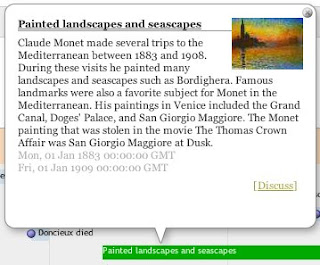 but they lack a few features that I needed, namely clicking on the thumbnail (if present) should take the user to the event link and the start and end depth should be rendered on a single line:
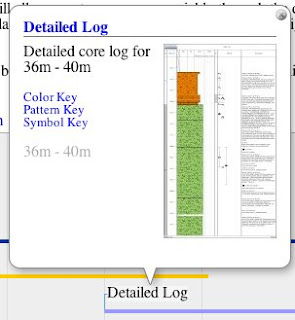
The markup for the event bubble is built programmatically in the fillInfoBubble() function on Timeline.DefaultEventSource.Event class. You can find the code at the end of the sources.js file in the Timeline distribution.
To customize the event bubble rendering, we just need to modify the fillInfoBubble() function and make it generate the markup we want. One option would be to go in and edit the sources.js file directly. This would accomplish our goal but it would mean we'd be modifying the Timeline source code and we would have to patch the file every time it was changed in the Timeline trunk.
The second option is to replace the function "on the fly" by modifying the Timeline.DefaultEventSource.Event prototype in our own code. The end is the same but we can do it without touching the Timeline sources. To accomplish this, we just need to overwrite the function after sources.js loads:
What this code does is create an anonymous function that runs immediately. Inside that function, we replace the current fillInfoBubble() implementation on the Event class with our own.
This code is an improvement over editing sources.js directly, but we can do one better. The problem with this approach is that we're replacing fillInfoBubble() for everyone. We're breaking any clients that depend on the old implementation, which is just bad form. What we'd really like to do is selectively apply our new implementation. Fortunately that's easy enough to do:
In this updated snippet we save the old function implementation then we check to see if the labeller is a DepthLabeller. If it isn't, we just pass it on to the original implementation, otherwise we use our customized implementation.
For completeness sake, here's the snippet I used to make the thumbnail image clickable and to render the depths on the same line:
Hope that was clear as mud!
In this post, I'm going to show you how to customize the rendering of event bubbles in Simile Timeline. The default bubbles look pretty nice:
 but they lack a few features that I needed, namely clicking on the thumbnail (if present) should take the user to the event link and the start and end depth should be rendered on a single line:
The markup for the event bubble is built programmatically in the fillInfoBubble() function on Timeline.DefaultEventSource.Event class. You can find the code at the end of the sources.js file in the Timeline distribution.
To customize the event bubble rendering, we just need to modify the fillInfoBubble() function and make it generate the markup we want. One option would be to go in and edit the sources.js file directly. This would accomplish our goal but it would mean we'd be modifying the Timeline source code and we would have to patch the file every time it was changed in the Timeline trunk.
The second option is to replace the function "on the fly" by modifying the Timeline.DefaultEventSource.Event prototype in our own code. The end is the same but we can do it without touching the Timeline sources. To accomplish this, we just need to overwrite the function after sources.js loads:
(function() {
Timeline.DefaultEventSource.Event.prototype.fillInfoBubble = function (elmt, theme, labeller) {
// build our custom markup
};
})();
What this code does is create an anonymous function that runs immediately. Inside that function, we replace the current fillInfoBubble() implementation on the Event class with our own.
This code is an improvement over editing sources.js directly, but we can do one better. The problem with this approach is that we're replacing fillInfoBubble() for everyone. We're breaking any clients that depend on the old implementation, which is just bad form. What we'd really like to do is selectively apply our new implementation. Fortunately that's easy enough to do:
(function() {
var default_fillInfo = Timeline.DefaultEventSource.Event.prototype.fillInfoBubble;
Timeline.DefaultEventSource.Event.prototype.fillInfoBubble = function (elmt, theme, labeller) {
   // if not a depth labeller, use the original
   if (!labeller.isDepthLabeller) {
       default_fillInfo.apply(this, arguments);
       return;
   }

   // build our custom markup
};
})();
In this updated snippet we save the old function implementation then we check to see if the labeller is a DepthLabeller. If it isn't, we just pass it on to the original implementation, otherwise we use our customized implementation.
For completeness sake, here's the snippet I used to make the thumbnail image clickable and to render the depths on the same line:
if (image != null) {
   var img = doc.createElement("img");
   img.src = image;
   theme.event.bubble.imageStyler(img);

   if (link != null) {
       var a = doc.createElement("a");
       a.href = link;
       a.target = "_blank"
       a.appendChild(img);
       elmt.appendChild(a);
   } else {
       elmt.appendChild(img);
   }
}

var divTime = doc.createElement("div");
if (this.isInstant()) {
   divTime.appendChild(elmt.ownerDocument.createTextNode(labeller.labelPrecise(this.getStart())));
} else {
   divTime.appendChild(elmt.ownerDocument.createTextNode(labeller.labelPrecise(this.getStart())));
   divTime.appendChild(elmt.ownerDocument.createTextNode(" - "));
   divTime.appendChild(elmt.ownerDocument.createTextNode(labeller.labelPrecise(this.getEnd())));
}
Hope that was clear as mud!
Friday, March 14, 2008
Simile Grails IE Bug Fixed
Just a quick post to let anyone interested in the Simile depth extension or Grails plugin that I fixed a small bug in IE that was preventing the depth stuff from loading. It's been pushed to the repository.
Wednesday, March 12, 2008
Simile Timeline and Grails
I just put the finishing touches on a Grails plugin for Simile Timeline. There's already the RichUI Grails plugin which provides a nice wrapper for incorporating Timeline into your Grails app. However, I couldn't use RichUI because it links to the libraries out at the Simile site instead of serving them up locally. This causes cross-domain issues when using my depth extension.
Developing the plugin wasn't too terribly difficult and it was a great opportunity to dig into the internals of Grails a bit. Its plugin architecture is pretty slick. I actually created my plugin directly inside the plugins directory of a webapp I was working on. This allowed me to develop on both the webapp and the plugin at the same time. It's a pretty nice way to work when you have a pretty decent understanding of which pieces you want to go in your webapp and which you want to go in your plugin.
My Simile Grails plugin does a bit more than just packaging the Timeline javascript for serving locally. I put together a handy SimileTagLib for including the libraries so you can simply throw a
You may be wondering why I called it the Simile plugin instead of the Timeline plugin or what have you. I actually made the plugin generic enough that if I have a need to later, I can package all of the Simile code in the same plugin. The Timeline code already relies on the Simile Ajax library, so the plugin actually packages both libraries.
Along with the taglib, I also created some Timeline-related domain classes for working with timelines and events. I used these domain classes to bootstrap the example webapp I was working on. I simply did a:
and I was up and running with a webapp that could create and edit timelines and events. Actually displaying the timelines took a bit more customizing, but not all that much.
I've made the source code for the completed webapp available via a Mercurial repository. The webapp gives you a CRUD style interface for creating timelines and timeline events. It supports both date-type of timelines as you see in the examples out at the Timeline site, as well as depth-type of timelines with my depth extension. I've put up a live demo on my development server at work. Feel free to play around with it by creating your own timeline and adding events. It'll stay up until as long as it isn't abused.
Developing the plugin wasn't too terribly difficult and it was a great opportunity to dig into the internals of Grails a bit. Its plugin architecture is pretty slick. I actually created my plugin directly inside the plugins directory of a webapp I was working on. This allowed me to develop on both the webapp and the plugin at the same time. It's a pretty nice way to work when you have a pretty decent understanding of which pieces you want to go in your webapp and which you want to go in your plugin.
My Simile Grails plugin does a bit more than just packaging the Timeline javascript for serving locally. I put together a handy SimileTagLib for including the libraries so you can simply throw a
<simile:ajax/>and a
<simile:timeline/>tag in your view and that will include the javascript libraries. I ran into a bit of a stumbling block when trying to do this because the Javascript code is actually in the plugin. Hardcoding the links wouldn't work because I would have to change the link every time I updated the plugin's version number (Grails installs a plugin as {plugin.name}-{plugin.version}). Fortunately, you can look up the plugin's name and version at runtime:
def p = PluginManagerHolder?.pluginManager.getGrailsPlugin('simile')
return "<script type="text/javascript" src="${request?.contextPath}/plugins/${p.name}-${p.version}/js/${lib}.js?"></script>"
You may be wondering why I called it the Simile plugin instead of the Timeline plugin or what have you. I actually made the plugin generic enough that if I have a need to later, I can package all of the Simile code in the same plugin. The Timeline code already relies on the Simile Ajax library, so the plugin actually packages both libraries.
Along with the taglib, I also created some Timeline-related domain classes for working with timelines and events. I used these domain classes to bootstrap the example webapp I was working on. I simply did a:
grails create-app timelines
cd timelines
grails install-plugin simile
grails generate-all Timeline  (domain class provided by the plugin)
grails generate-all TimelineEvent  (ditto)
grails run-app
and I was up and running with a webapp that could create and edit timelines and events. Actually displaying the timelines took a bit more customizing, but not all that much.
I've made the source code for the completed webapp available via a Mercurial repository. The webapp gives you a CRUD style interface for creating timelines and timeline events. It supports both date-type of timelines as you see in the examples out at the Timeline site, as well as depth-type of timelines with my depth extension. I've put up a live demo on my development server at work. Feel free to play around with it by creating your own timeline and adding events. It'll stay up until as long as it isn't abused.
Monday, March 10, 2008
Simile Timeline
Over the last week or so, I've been working on a webapp for managing expedition sample requests. One of the bigger challenges has been to find an effective way to visualize the sample requests. Traditional histograms and line graphs are an option, but they offer limited interactivity. I was hoping to find something more "snazzy" to let the users really explore the data.
I mentioned this in passing to my friend Doug Fils and he pointed me to Simile Timeline. Timeline is something I had seen in passing before but hadn't considered for this particular project. Timeline provides a Google Maps-type interface for exploring time-based data. I really liked the interface, but needed a way to put depth on the scale instead of time. It turns out I wasn't the only one looking for different units.
After chiming in on enhancement request, the original reporter, Charlie Kershner, sent me an email with the solution he'd come up with: use years, decades, centuries, and millennia as proxies for metric depth units. The conversion factors are all right, it's just the units that are wrong. This is a really clever solution, so I was glad Charlie passed it along. Using it, I had a working demo in about an hour.
I decided to poke around in the Timeline code to see what it would take to properly support depths. It is a really coherently designed tool with well defined interfaces for extension and customization. I can't claim to be fully understand everything, but with a little monkey see, monkey do, and a bit of brute force, I got proper depth support:

This is the default rendering. I think for my application, I'll end up customizing the event painters. I need to find a way to simplify the rendering, especially in busy sections like this. There's also a fair number of errors in the data that I need to go back and fix. Being able to visualize it in this form makes it really easy to see the errors (Hint: those blue bars at the top and bottom of the main band represent typos in the data. There were no multi-meter samples...)
I don't have a live demo for people to play with because I'm working with "live" data that isn't public. However, there are numerous examples out at the Timeline site. There were a few gotchas I ran into while developing and testing things:
The code for the depth extension is available in a Mercurial repository where you can grab a zip of the most recent version. Feel free to use it however you like. I've offered to contribute the code to the main Timeline repository so future versions may not require you to host your own Timeline.
I mentioned this in passing to my friend Doug Fils and he pointed me to Simile Timeline. Timeline is something I had seen in passing before but hadn't considered for this particular project. Timeline provides a Google Maps-type interface for exploring time-based data. I really liked the interface, but needed a way to put depth on the scale instead of time. It turns out I wasn't the only one looking for different units.
After chiming in on enhancement request, the original reporter, Charlie Kershner, sent me an email with the solution he'd come up with: use years, decades, centuries, and millennia as proxies for metric depth units. The conversion factors are all right, it's just the units that are wrong. This is a really clever solution, so I was glad Charlie passed it along. Using it, I had a working demo in about an hour.
I decided to poke around in the Timeline code to see what it would take to properly support depths. It is a really coherently designed tool with well defined interfaces for extension and customization. I can't claim to be fully understand everything, but with a little monkey see, monkey do, and a bit of brute force, I got proper depth support:

This is the default rendering. I think for my application, I'll end up customizing the event painters. I need to find a way to simplify the rendering, especially in busy sections like this. There's also a fair number of errors in the data that I need to go back and fix. Being able to visualize it in this form makes it really easy to see the errors (Hint: those blue bars at the top and bottom of the main band represent typos in the data. There were no multi-meter samples...)
I don't have a live demo for people to play with because I'm working with "live" data that isn't public. However, there are numerous examples out at the Timeline site. There were a few gotchas I ran into while developing and testing things:
- You need to serve your own copy of Timeline because of cross-domain issues with mixing code from the Simile site and from a local extension.
- You need to tell Timeline to use your new unit in two different places--when you create the event source and when you actually create the timeline. Failure to do so will have you pulling out your hair chasing down errors.
- You need to use your customized methods to create your bands
- Not all of the rendering options (like showEventText: false) seem to work. I think this is because I don't fully understand the rendering pipeline and how it is customized. This is one area I'm going to be looking at in the future.
var tl;
function onLoad() {
var eventSource = new Timeline.DefaultEventSource(new SimileAjax.EventIndex(Timeline.DepthUnit));

 var theme = Timeline.ClassicTheme.create();
 theme.event.bubble.width = 320;
 theme.event.bubble.height = 220;
 var d = Timeline.DepthUnit.wrapDepth(0)
 var bandInfos = [
     Timeline.Depth.createBandInfo({
         eventSource:    eventSource,
         date:           d,
         width:          "80%",
         intervalUnit:   Timeline.DepthUnit.METER,
         intervalPixels: 100
     }),
     Timeline.Depth.createBandInfo({
         eventSource:    eventSource,
         date:           d,
         width:          "20%",
         intervalUnit:   Timeline.DepthUnit.DECAMETER,
         intervalPixels: 25,
         overview:       true,
         convertToBaseUnit: true
     })
 ];
 bandInfos[1].syncWith = 0;
 bandInfos[1].highlight = true;

 tl = Timeline.create(document.getElementById("tl"), bandInfos, Timeline.HORIZONTAL, Timeline.DepthUnit);
 tl.loadJSON("samples.js", function(json, url) {
     eventSource.loadJSON(json, url);
 });
}
var resizeTimerID = null;
function onResize() {
 if (resizeTimerID == null) {
     resizeTimerID = window.setTimeout(function() {
         resizeTimerID = null;
         tl.layout();
     }, 500);
 }
}
The code for the depth extension is available in a Mercurial repository where you can grab a zip of the most recent version. Feel free to use it however you like. I've offered to contribute the code to the main Timeline repository so future versions may not require you to host your own Timeline.
Subscribe to:
Posts (Atom)
